Settings window
AeroSpace-edge edits its own config from a GUI. Open it from the menu-bar icon → Settings…. It is not a separate config store: it reads and writes the same TOML file AeroSpace-edge already loads at startup, in place.
The window has two kinds of control:
- Application controls (the Menu Bar and Application destinations) act immediately and never touch your TOML.
- Configuration controls (everything else) build a draft. Nothing is written until you press Save.
Each page in this section mirrors one destination in the window's sidebar, in the same order, so "where do I change this?" has a one-line answer everywhere.
| Destination | What you change there |
|---|---|
| General | Start at login, automatic reload, hidden-app unhiding, config version |
| Layout | Default layout and orientation for new workspaces, normalization, accordion padding |
| Gaps | Inner and outer spacing, optionally per monitor |
| Focus | Following app activation, new-window flicker |
| Window Border | The focused-window overlay and its appearance |
| Workspaces & Monitors | Persistent workspace list and monitor priority |
| Key Mapping | Keyboard preset and key-notation overrides |
| Exec | Environment handed to exec-and-forget commands |
| Keybindings | Raw [mode.*.binding] TOML |
| Window Rules | Raw [[on-window-detected]] TOML |
| Callbacks | Raw lifecycle callback TOML |
| Menu Bar | How workspaces are drawn in the menu-bar item (no TOML) |
| Application | Config-file actions, crash reports, version info (no TOML) |
About the screenshots
The pane screenshots were taken before the Application destination was added, so the sidebar in them stops at Callbacks. Everything else matches the current window.
How a Save works
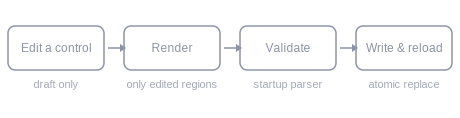
Check for Updates… sits in the window footer, so it is reachable from every destination. It acts immediately and never touches your TOML.
The raw TOML editors — Keybindings, Window Rules, Callbacks, and the whole-file editor shown when a config doesn't parse — colour comments, strings, numbers, booleans, table headers and keys, following VS Code's light and dark palettes. The colouring is derived from the text, not from a parse, so a half-typed or invalid document still reads as TOML; Save remains the only thing that validates.
Editing any control enables Save and Revert. Reopening an already-visible window does not reload it and discard your draft; Revert reloads from disk. While a Save or a reload is running, every control and both buttons are frozen, so an edit can't land in the gap and be silently thrown away.
Before touching the real file, Settings renders a candidate into a temporary file and validates the whole document with the same parser used at startup:
- Validation fails → nothing is written and the error is shown in the footer.
- Validation passes → the resolved target is replaced atomically, its POSIX permissions are restored, the active config is reloaded, and the footer reports Saved and reloaded.
If the file's modification date changed after Settings loaded it, Save first offers Overwrite, Discard my changes, and Cancel. Overwrite still goes through normal validation; Discard reloads the external version.
What a Save rewrites
Only the regions you actually edited are emitted.
| You changed | What is rewritten |
|---|---|
| A single scalar | Just that key. Untouched scalars, unknown keys, comments, ordering and whitespace stay byte-identical. |
Anything in gaps, key-mapping, exec, or workspace-to-monitor-force-assignment |
The complete table family, including sub-tables. Comments and custom ordering inside that family do not survive. |
| Keybindings or Window Rules | That pane's complete owned table family. |
| Callbacks | Its five owned keys are removed from their old positions and reinserted as the edited block. |
| Nothing in a pane or table family | It stays byte-identical. |
Which file Settings edits
Settings edits whichever config AeroSpace-edge already resolved at startup — the same
lookup order, and the same --config-path override, described in
Custom config location. Three cases are specific to
this window:
No custom config yet. Settings shows the bundled default. The first Save creates
~/.aerospace-edge.toml, seeded from that default; the footer announces this before
writing. Application → Open config likewise copies the bundled default there before
opening it.
Two candidates in the same resolution tier. Settings opens read-only and lists them rather than guessing which one you meant.
When the resolved path is a symlink, Settings reads and writes the target. The symlink stays a symlink, the target's permissions are preserved, and a migration backup is placed beside the real target.
Defaults shown here are parser fallbacks
The default listed on each page is what the parser assumes when the key is absent,
which can differ from what the bundled default config writes explicitly. The clearest case
is config-version: omitting it means version 1, while the bundled default writes
version 2. See Config version migration.
Find a setting by TOML key
| TOML key | Where in Settings |
|---|---|
start-at-login, auto-reload-config |
General → Startup |
automatically-unhide-macos-hidden-apps |
General → macOS integration |
config-version |
General → Config version |
default-root-container-layout, default-root-container-orientation |
Layout → Default container |
enable-normalization-* |
Layout → Normalization |
accordion-padding |
Layout → Accordion |
gaps.inner.*, gaps.outer.* |
Gaps |
focus-follows-app-activation |
Focus → Focus follows app activation |
new-window-prevent-flicker |
Focus → New windows |
focused-window-border* |
Window Border |
persistent-workspaces |
Workspaces & Monitors → Persistent workspaces |
workspace-to-monitor-force-assignment |
Workspaces & Monitors → Workspace and monitor priority |
key-mapping.* |
Key Mapping |
exec.* |
Exec |
mode.*.binding |
Keybindings |
on-window-detected |
Window Rules |
after-startup-command, on-focus-changed, on-mode-changed, on-focused-monitor-changed, exec-on-workspace-change |
Callbacks |
When Settings can't edit normally
The config doesn't parse. Settings can't build structured controls from a file it can't read, so it shows the parser error and one raw editor over the whole file. Edit and Save there — whole-file validation still runs before writing — and the structured form comes back after a successful save and reload.
Several config files exist in the same tier. Settings opens read-only and lists the candidates. Remove or rename all but one, then reopen Settings. It never writes to an arbitrary candidate.
A raw pane shows green but Save fails. The green status on Keybindings, Window Rules and Callbacks means only that that fragment parses on its own. Cross-section conflicts and the complete source are checked by Save, and Save's result is the authoritative one.